► Download "Gallaudet TrueType" font (gallaudet.ttf)
The Gallaudet TrueType
font allows you to use your keyboard to type messages that
appear as fingerspelling on your computer screen and that you can print out.
Note: If you want to send fingerspelled messages to your friend then your
friend has to have the Gallaudet font installed on their machine too in
order for the message to show up as fingerspelling. The font may be used for learning sign language,
correspondence using sign language, or whatever purpose you dream up.
The "Gallaudet Font" comes to you from Insect Bytes and is copyright (c) 1991 by David Rakowski. All Rights Reserved. Used with permission. If you like
and/or use this font, please make a substantial contribution to the charity
of your choice. (For example,
ASL University.)
 (That button takes you to the ASL University donation
page.)
(That button takes you to the ASL University donation
page.)
Here is a sample of what the letters look like:

Installation Instructions:
For Windows 10:
1 - Click on Download the Font link.
2 - You will be asked what you want to do with the download.
3 - Click Open.
4 - The font will be displayed in variety of sizes.
5 - Click Install.
If you have any problems, check to make sure you are logged on
as an administrator and/or if it asks for administrator
permission grant it. Also, try restarting your device.
(For more installation instructions, see below)
Notes:
Instructions for older Windows Operating systems:
To manually
install or re-install a font:
1. Click the "Window" key and hold it down while you click the "R"
key -- which should open up a "run" dialog window.
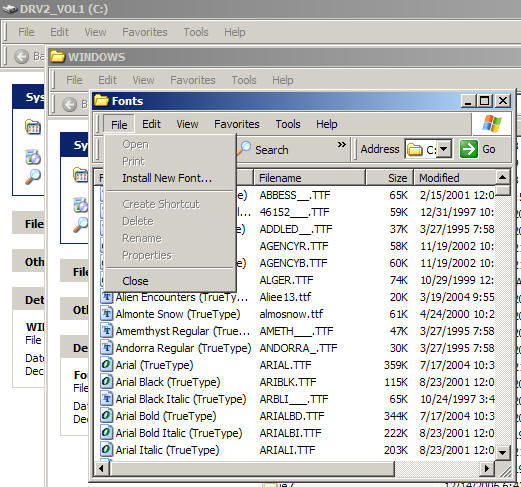
2. Type %windir%\fonts, and then click OK.
3. On the File menu, click Install New Font.
If you do not see the "install new font" option...check to see if you are logged on with "administrative
privileges."
4. In the Drives box, click the drive that has the floppy or CD-ROM
that contains the fonts you want to add. If you are installing fonts
from a floppy disk, this is typically drive A or drive B. If you are
installing the fonts from a compact disc, your CD-ROM drive is
typically drive D. Double-click the folder that contains the fonts.
5. Click the font you want to add. To select more than one font at a
time, press and hold down the CTRL key while you click each font.
6. Click to select the Copy Fonts To Fonts Folder check box. The
Windows\Fonts folder is where the fonts that are included with
Windows are stored.
7. Click OK.
Steve @tstar.net writes:
Dear Dr.
Bill,
I was trying to download this file but instead of download directions, I was
shown the file itself.
How can I download it?
- Steve
Steve,
Try this:
Right click on the download font link. (Not Left click)
Then when you see the menu that appears, click on "Save Target As"
Then when you get a box asking you where you want to save it and what you
want to call it...save it to your c:\windows\fonts directory.
Then reboot your computer and open up your word processor. It should show up
in your list of available fonts in your word processor.
- Dr.
Bill
Dr Bill,
Thanks for the directions,
I had been left-clicking instead of
right and such was my trouble. No more. Downloaded the file and have
installed it in the 'fonts' section of Windows. Your directions were
perfect.
Thanks,
- Steve
In a message dated (a frigging long time ago) 8:03:05 AM Pacific Daylight Time, a
student writes:
Good Morning!
My name is Willie Jackie Mitchell, am Deaf Person. I think it is great ASL
University...
I have been looking for ABC's Fingerspelling CD-ROM... For example, I type words said, "Rainbow" and it fingerspell out of "Rainbow" on the paper, Do you understand what I am try explain? Do you have ABC's Fingerspelling? I would like to have CD-ROM because CD-ROM is much easier to install better than download the file of ABC's Fingerspelling...
Let me know about ABC's Fingerspelling CD-ROM.
Thank you for your time and Have a nice day.
Willie Mitchell
Willie,
I do understand what you are asking but I don't know where you'd get one of
those CDs. I'm pretty sure they are out of publication (not being made any
more).
If you want to try downloading the font, here are some
suggestions:
Download the file:
gallaudet.ttf and
save it somewhere that you can find it again.
Then click "Start", "Settings", "Control Panel". Then double click fonts. From the menu, click File, Install New Font.
The "Add Fonts" dialog box appears. You'll need to navigate to and select the gallaudet.ttf file.
After which I suggest you restart your computer.
Then go to your word processing program and select the gallaudet font. Begin typing and it should look like little fingerspelling handshapes. I suggest making the font size 36 or bigger so you can see the handshapes clearly.
- Dr.
Bill
In a message dated (a long time ago) 8:05:36 PM Central Standard Time, a student
writes:
"Ok.... I tried to download the fonts and I
couldn't get it to open once I downloaded it. Any suggestions?"
Response: Try downloading the file again, and this time make a note of the location
it is downloading to. The file you downloaded then needs to be put into your operating system's
FONTS folder. You can
do a search for that folder using your computer's search function. Or go to
your run line and type the word "fonts" and click okay. Open up your FONTS folder.
Make sure you have placed the gallaudet file into the folder and can see it. Then click
on the "FILE" menu and look for an "Install New Font..." menu choice. Click
on that and then navigate to the font file you want to install. Then double
click that file.
Sometimes you get a message stating that the file has "already been
installed." That's okay, go through the whole install process anyway to
make sure the file gets registered in your operating system the right way.
A student says: When I start the following "Start", Settings, Control
Panel and then double click on fonts, The Install new
font doesn't come up. I'll keep trying though.
Dr. Bill's response: You are almost there.
Check to make sure you are logged in as an administrator or else you might
not have permission to install the font and your computer might not show the
font installation option to you.
Open/Click "Start", "Settings", "Control Panel". Then
double click fonts. THEN, from
the menu selections at the top of the window, click File, Install New Font.
The "Add Fonts" dialog box appears. You'll need to
navigate to and select the
gallaudet file.
Then go to your word processing program and select
the gallaudet font. You may need to shut down and restart before it
shows up as a font choice in your word processing program's list of fonts.
In a message dated (a long time ago) 5:09:09 PM Central Daylight Time, kcdrummond@_____.com
writes:
Dear Dr. Bill:
I recently cruised your site and found mention of the gallaudet font. I
downloaded that font to my font folders and all works well inside of my
"MS Works" word processor. However, when I select this text to copy to emails it
automatically changes to an English font. Is there anyway I can keep that gallaudet font to send in e mails?
Thanks
Cheryl
Hi Cheryl,
This has to do with the settings in your email program. Most email programs
have a default setting that determines what font is displayed. After
installing the fingerspelling font, you can go to your emails preferences or
settings menu and select "gallaudet."
I'm sending this reply in gallaudet type font. I'm using AOL and in my email
program it looks like handshapes. I did have to set the font from within the
email program itself. I also had to enlarge the size to make
it big enough to read. So you might want to check to see if your email
program has a way to choose the font. Whomever receives your message will
only see the fingerspelling if they too have downloaded the font. The
other person has to have the font installed and selected or the font will
just change back to their default font. They
may also have to adjust their emails preferences to display messages using
that font.
Dr.
Bill
[Note: The above text was changed back to regular font for this
web page.]
In a message dated 9/5/2003 7:44:30 AM Pacific Daylight Time,
Vicki
writes:
<<I still have some trouble getting ASL fingerspelling fonts set up in my
e-mail or word processing so I could write my own homework for my class or
to the loved one. >>
Vicki,
About the emailing of ASL fonts: It won't work unless the other
person has that same font installed on their system. If you have it
installed it will look right on your screen when you click the send button,
but not show up in the receivers email because THEIR system doesn't have the
font installed and selected as a default font for incoming email messages--it
will be converted to their normal font).
Also, some people who are using the "Windows ME" operating system can't find their font folder
that should be in their C:\windows\ file. Or if it is, they don't see an
"Install New Font" choice under the "File" menu. If that is your situation
and you are using a Microsoft Windows operating system, click the "START"
button. Then click "RUN." In the RUN dialog box, type: Attrib +S
C:\Windows\Fonts and then click OK. You might need to restart your computer
then check to see if the Fonts folder or Install New Font option appears.
An other option for additional help on installing the ASL font is to take advantage of your computer's help menus. Look for a "Help" or "Help and Support" button in your "Start" menu.
Dr. Bill
Instructions for installing this font to Macs:
Katie (who uses a Mac) writes:
In a message dated 4/20/2012 5:06:00 P.M. Pacific Daylight Time, kkutch87
writes:
I got it to work on my computer!!
What I did was download the
file and it
automatically goes into your "font book". From there I had different sub
sections of fonts like 'English', 'Fun', 'Web' etc, so from there in order
to make the Gallaudet font appear on a Word doc, I had to drag it over to
one of those sub sections (I put mine in the fun section) and from there it
showed up on the list of fonts when in Word!
Thank you Dr. Vicars for the hook up! :)
- Katie
Kyle Richtig sent me the following instructions for installing the Gallaudet
truetype font to Apple computers:
1. Download the font by using the Mac Version of right click. (Hold down
ctrl and click so the menu comes up).
2. Choose Download Link to Disk.
3. Drag this file (GALLAUDET.ttf) from the saved location to the Fonts
Folder (Home>Library>Fonts).
4. If this did not install the font, you may have to double click the file
once it is in your Font Folder. This will automatically install it in your
Font Book.
► Download OLD Mac Version:
(http://www.lifeprint.com/asl101/fingerspelling/gallaudet/gallaudet.sit)
The ".sit" extension on the file denotes a "stuffit" extension which means that the file is indeed "compressed" and needs to be decompressed with an "expander"-type program. (Google "stuffit") Often (especially on newer systems) decompression takes place automatically.
-- Dr. Bill
Notes: